
Last updated on
Oct 2, 2026

Canada Ryerson University Conflict Override Form 2012-2026 free printable template
We are not affiliated with any brand or entity on this form

Fill out
Complete the form online in a simple drag-and-drop editor.

eSign
Add your legally binding signature or send the form for signing.

Share
Share the form via a link, letting anyone fill it out from any device.

Export
Download, print, email, or move the form to your cloud storage.
Why pdfFiller is the best tool for your documents and forms


End-to-end document management
From editing and signing to collaboration and tracking, pdfFiller has everything you need to get your documents done quickly and efficiently.
Accessible from anywhere
pdfFiller is fully cloud-based. This means you can edit, sign, and share documents from anywhere using your computer, smartphone, or tablet.
Secure and compliant
pdfFiller lets you securely manage documents following global laws like ESIGN, CCPA, and GDPR. It's also HIPAA and SOC 2 compliant.
What is Canada Ryerson University Conflict Override Form
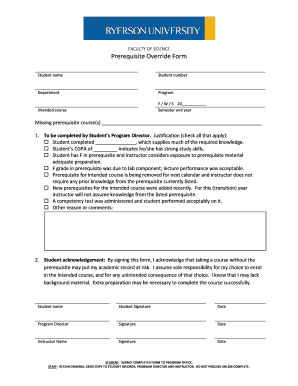
The Faculty of Science Conflict Override Form is a permission request document used by students to enroll in conflicting courses for the academic semester.
pdfFiller scores top ratings on review platforms




Who needs Canada Ryerson University Conflict Override Form?
Explore how professionals across industries use pdfFiller.

Canada Ryerson University Conflict Override Form is needed by:
-
Students seeking course enrollment despite scheduling conflicts
-
Course Instructors requiring approval for enrollment overrides
-
Program Directors overseeing student course approvals
-
Academic Advisors assisting students with timing issues
-
Enrollment Management staff processing course override requests
Comprehensive Guide to Canada Ryerson University Conflict Override Form
What is the Faculty of Science Conflict Override Form?
The Faculty of Science Conflict Override Form is designed to help students manage course enrollment conflicts. It serves the crucial function of allowing requests for permission to enroll in courses that have scheduling overlaps, ensuring that academic paths remain uninterrupted. Situations necessitating this form might include overlapping course schedules or other educational conflicts. Governed by the Faculty of Science Policy on Conflict Overrides, this document ensures standardized processes for addressing student needs efficiently.
Purpose and Benefits of the Faculty of Science Conflict Override Form
This form plays a vital role in optimizing the academic experience of students. By utilizing the Faculty of Science Conflict Override Form, students can effectively manage enrollment in conflicting courses, thereby reducing stress and confusion surrounding their schedule. This approach not only facilitates academic progression but also ensures that students have proper documentation to support their requests, providing peace of mind throughout the approval process.
Who Needs the Faculty of Science Conflict Override Form?
The target audience for the Faculty of Science Conflict Override Form includes students, instructors, and program directors. Each role interacts uniquely with the form: students fill it out to request overrides, instructors must sign it to confirm their awareness of the conflict, and program directors oversee the process. Understanding the involvement of each party is essential for efficient conflict resolution.
Eligibility Criteria for Using the Faculty of Science Conflict Override Form
To be eligible for the Faculty of Science Conflict Override Form, students must meet certain academic conditions. These may include specific prerequisites regarding coursework or performance metrics such as GPA. Additionally, only particular situations like genuine schedule conflicts qualify for an override, ensuring that requests are legitimate and aligned with academic policies.
How to Fill Out the Faculty of Science Conflict Override Form Online (Step-by-Step)
Filling out the Faculty of Science Conflict Override Form is straightforward. Follow these steps:
-
Access the form on the pdfFiller platform.
-
Complete each section meticulously, including personal details like 'Student name' and 'Student No.'
-
Provide a thorough explanation for the override request, detailing reasons for the conflict.
-
Ensure that required signatures are collected from both instructors and the program director.
-
Review all information to confirm accuracy before submitting.
Attention to detail, especially in justifying the request, enhances the likelihood of approval and helps in conflict management planning.
Common Errors and How to Avoid Them When Submitting the Faculty of Science Conflict Override Form
Submissions may face pitfalls if certain errors are made. Common mistakes include:
-
Incomplete fields that may lead to processing delays.
-
Missing signatures that invalidate the request.
-
Providing insufficient justification for the conflict.
To mitigate these issues, double-check all entries, validate the information, and ensure signatures are properly obtained before final submission.
Submission Methods and Tracking Your Faculty of Science Conflict Override Form
Once the Faculty of Science Conflict Override Form is completed, it can be submitted in various ways. Students can choose to submit the form either online or in person, depending on the instructions provided by their institution. After submission, it is common to receive confirmation of receipt along with timelines for decision-making. Be aware that there may be associated fees for processing, depending on university policy.
What Happens After You Submit the Faculty of Science Conflict Override Form?
Post-submission, the Faculty of Science Conflict Override Form undergoes a review process. The request goes through necessary approval steps, and students will be informed of outcomes based on decisions made. If a request is denied or requires further clarification, students will receive guidance on how to proceed, ensuring transparency and support throughout the process.
Leveraging pdfFiller for Your Faculty of Science Conflict Override Form Needs
Utilizing pdfFiller for the Faculty of Science Conflict Override Form enhances the overall experience. With capabilities like editing, eSigning, and robust submission tracking, pdfFiller simplifies the administrative tasks associated with form completion. Users benefit from the convenience and security that the platform offers, allowing them to handle sensitive educational documents efficiently.
Engage with pdfFiller for Your Document Management Needs
Exploring pdfFiller's features for filling and managing forms can greatly benefit users. The platform supports extensive document handling capabilities while maintaining high-security standards, giving users confidence when managing sensitive information. By adopting pdfFiller for their PDF-related activities, individuals can streamline their educational form processes seamlessly.
How to fill out the Canada Ryerson University Conflict Override Form
-
1.Access pdfFiller and search for the Faculty of Science Conflict Override Form by typing its name in the search bar.
-
2.Open the form by clicking on it, which will load the interactive fields for completion.
-
3.Gather necessary information beforehand, including your student details, course names, and instructor contacts to streamline the process.
-
4.Navigate through the form’s blank fields, filling out your name, student number, and details of the conflicting courses clearly in the designated spaces.
-
5.Use pdfFiller’s checkboxes to indicate any relevant agreement or acknowledgment sections provided in the form.
-
6.Make sure to provide a detailed explanation of why the conflict override is necessary and how you intend to manage any schedule overlaps.
-
7.Fill in the signature fields by clicking on them and digitally signing as needed; instruct your course instructors and program director to review and sign the document too.
-
8.Once all fields are complete and signatures are acquired, review the entire form for correctness, ensuring all details are accurate.
-
9.When you are satisfied with your entries, save the completed form by clicking on the 'Save' button, allowing you to download it directly to your device or send it via email.
-
10.If submitting the form online, follow the submission instructions provided by your institution, ensuring you have attached any required supporting documents.

Who is eligible to use the Faculty of Science Conflict Override Form?
Students who wish to enroll in two courses with scheduling conflicts are eligible to use this form. It is essential for them to obtain the necessary approvals from instructors and the program director.
What details must I provide when filling out this form?
You must provide your name, student number, the names of both conflicting courses, and a clear explanation for needing the override. Signature sections for course instructors and the program director are also required.
What happens if I do not submit this form on time?
Late submissions may jeopardize your ability to enroll in the desired courses. It’s advisable to check the course registration deadlines and submit your request as early as possible.
How do I submit the Faculty of Science Conflict Override Form?
You can submit the form electronically through your institution's registration portal or by emailing it directly to the appropriate department as instructed. Ensure all signatures are collected before submission.
Are there any supporting documents required for this request?
Typically, supporting documents are not required. However, you should confirm with your department if additional documentation, like an academic advisor's statement, is necessary for your specific situation.
What should I do if I encounter errors while filling out the form?
If you encounter any errors, double-check the fields for accuracy. If issues persist, utilize pdfFiller’s help function or contact your school’s IT support for assistance.
How long does it take to process the conflict override requests?
Processing times can vary depending on the institution. Generally, allow at least two weeks for approvals to ensure any enrollment changes can be made before the semester starts.
Related Forms



Get the latest insights from our blog


If you believe that this page should be taken down, please follow our DMCA take down process
here
.
This form may include fields for payment information. Data entered in these fields is not covered by PCI DSS compliance.